Enshrouded Adventure Sharing - Upload, Browse & Visit World Builds
Enshrouded Adventure Sharing: upload your world, browse community builds, and visit them. What shipped in Update 8 (v1) and what V2 adds after 1.0.
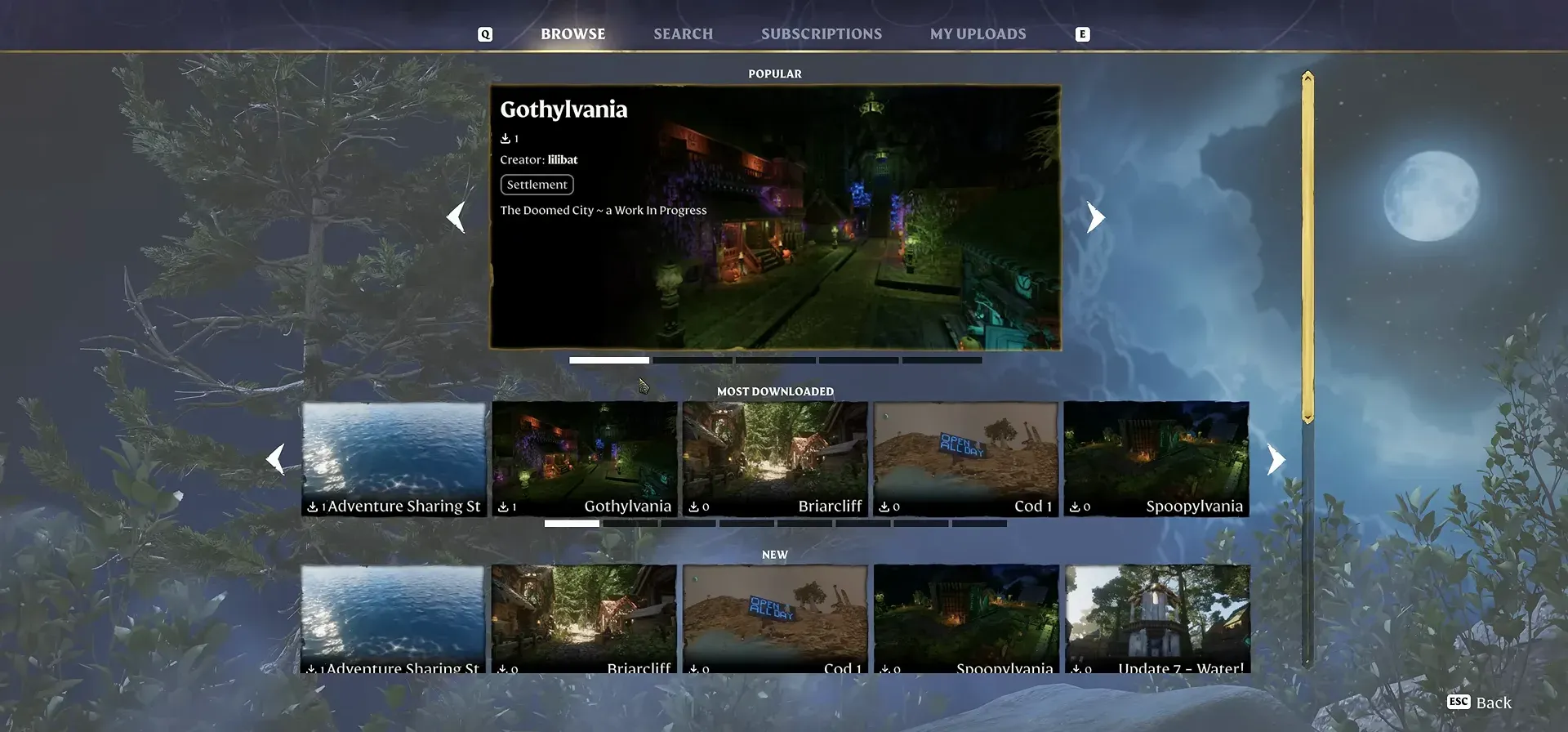
Adventure Sharing is a built-in way to share your Enshrouded builds and worlds. It lets you upload the world you have created - buildings, terrain changes, and placed items - so other players can browse, download, and visit it, and lets you do the same for the community’s worlds. It first shipped with Update 8 (Forging the Path, April 21, 2026) as version 1.
Scope note: Everything on this page is confirmed by Keen’s official patch notes and the Adventure Sharing terms. The V2 features are announced but not yet built, so they are marked not yet independently verified.
What Adventure Sharing does
At its core, Adventure Sharing turns your save into shareable content:
- Upload your world. You share the environment you built by building, terraforming, and placing items, with a title, description, tags, and preview screenshots.
- Browse the community. Search other players’ worlds by name, filter by tags, and see what the community has built.
- Visit a world. Download and enter another player’s world to see it in person.
Keen’s goal is that you can hop into Enshrouded depending on your mood and find something new and exciting without relying on the main story for fresh content.
What shipped in version 1 (Update 8)
Version 1 is the foundation - focused on base uploads and sightseeing visits. Concretely:
- A new menu. The main menu was reworked with a dedicated Adventure Sharing hub for uploading and browsing.
- A craftable camera. A new camera item lets you take in-game screenshots of your base to use as a preview and to show why other players should visit.
- Spawn point toggle. A toggle at the Flame Altar lets you define where visitors spawn when they enter your world - build a proper entrance rather than a scattered arrival.
- Curated content. Keen had favorite community creators and contest winners upload their worlds before launch, so the library is populated from day one.
Visits are read-only in v1
When you visit another player’s world in version 1, you are on a sightseeing tour. You cannot pick up items, interact with enemies, or earn XP - attempting to do so shows a “Progression Disabled” message. This is intentional: v1 exists to gather feedback and establish the technical foundation, while the interactive features are built toward 1.0.
1.0 check (launch day): the patch notes confirm Sparkworks shipped with a 2D connection editor, new tools and interactive props, plus menu improvements (undo-able votes, viewing and voting while playing). Exact menu labels and the visitor XP/loot behavior stay pending in-game verification.
The terms, in short
Adventure Sharing is a free in-game feature (no purchase beyond the game itself). From the official terms:
- User content is what you upload: the world, its title, description, screenshots, and player-owned in-game text.
- You keep the rights, but you grant a license so the community can access your world. You may not sell, paywall, or associate your content with NFTs or blockchain.
- Accessing a world means entering and interacting with it, but your changes are not saved - the XP, items, and achievements you get while visiting stay on your own profile.
- A platform ID (for example your Steam ID) identifies the uploader.
What Adventure Sharing V2 will add
Version 1 is only the beginning. Keen has confirmed that after 1.0, Adventure Sharing V2 will give players the tools to build interactive content for others to explore:
- Logic systems for interactive elements.
- Puzzles and enemy spawning.
- Traps and other interactive mechanics.
- The wiring layer behind these is the Sparkworks logic system, shipping with 1.0 (not yet independently verified on exact v2 timing).
Shipped at 1.0: the V2 feature list landed as Sparkworks — wire inputs (levers, pressure plates) to outputs (doors, traps) to build trap dungeons, puzzle rooms, arenas and escape rooms.
In short, V2 is the step from “sightseeing tours of bases” to “full player-made adventures and mini-games.”
Where to go next
- Build the world you want to share. The base design gallery has layouts and tips for all seven biomes.
- Understand the building loop. The Enshrouded beginner guide covers the Flame Altar and your first base.
- See what else Update 8 changed. The Update 8 (Forging the Path) patch notes cover the skill tree and combat rework.
- Follow the bigger picture. The Enshrouded roadmap tracks 1.0 and the post-1.0 plans.
常见问题
What does the Enshrouded Adventure Sharing - Upload, Browse & Visit World Builds guide cover?
What Adventure Sharing does?
What shipped in version 1 (Update 8)?
The terms, in short?
相关文章
guides
Enshrouded Hotfix 1.0.1.1 - Onslaught Bosses, Artifact Chests & Crash Fixes
Enshrouded Hotfix 1.0.1.1 (build 1285601): Onslaught boss mechanics, more rune drops, resistance/haste buff stacking, enchanting fix, crash fixes
guides
Enshrouded Patch 1.0.1.0 - Boss Balance & Quality of Life
Enshrouded Patch 1.0.1.0 (build 1283531): boss fixes, boss-balance pass, sprint-toggle, voice-chat QoL, stability sweep.
guides
Enshrouded Cinder's Cradle - Lava Biome, Sky Islands & Level 45-50
Cinder's Cradle is Enshrouded's end-game lava biome (levels 45-50, Flame 9-11) of mountains and sky islands added in 1.0. How to reach and survive it.
有帮助吗?
感谢你的反馈!