Enshrouded Adventure Sharing - Sube, explora y visita mundos construidos
Enshrouded Adventure Sharing: sube tu mundo, explora builds de la comunidad y visítalos. Qué llegó en Update 8 (v1) y qué añade V2 después de 1.0.
Adventure Sharing es la forma integrada de Enshrouded para compartir tus construcciones. Te permite subir el mundo que has creado - edificios, cambios de terreno y objetos colocados - para que otros jugadores puedan explorar, descargar y visitarlo, y te permite hacer lo mismo con los mundos de la comunidad. Llegó por primera vez con Update 8 (Forging the Path, 21 de abril de 2026) como versión 1.
Nota de alcance: Todo en esta página está confirmado por las notas de parche oficiales de Keen y los términos de Adventure Sharing. Las funciones de V2 están anunciadas pero aún no construidas, así que están marcadas not yet independently verified.
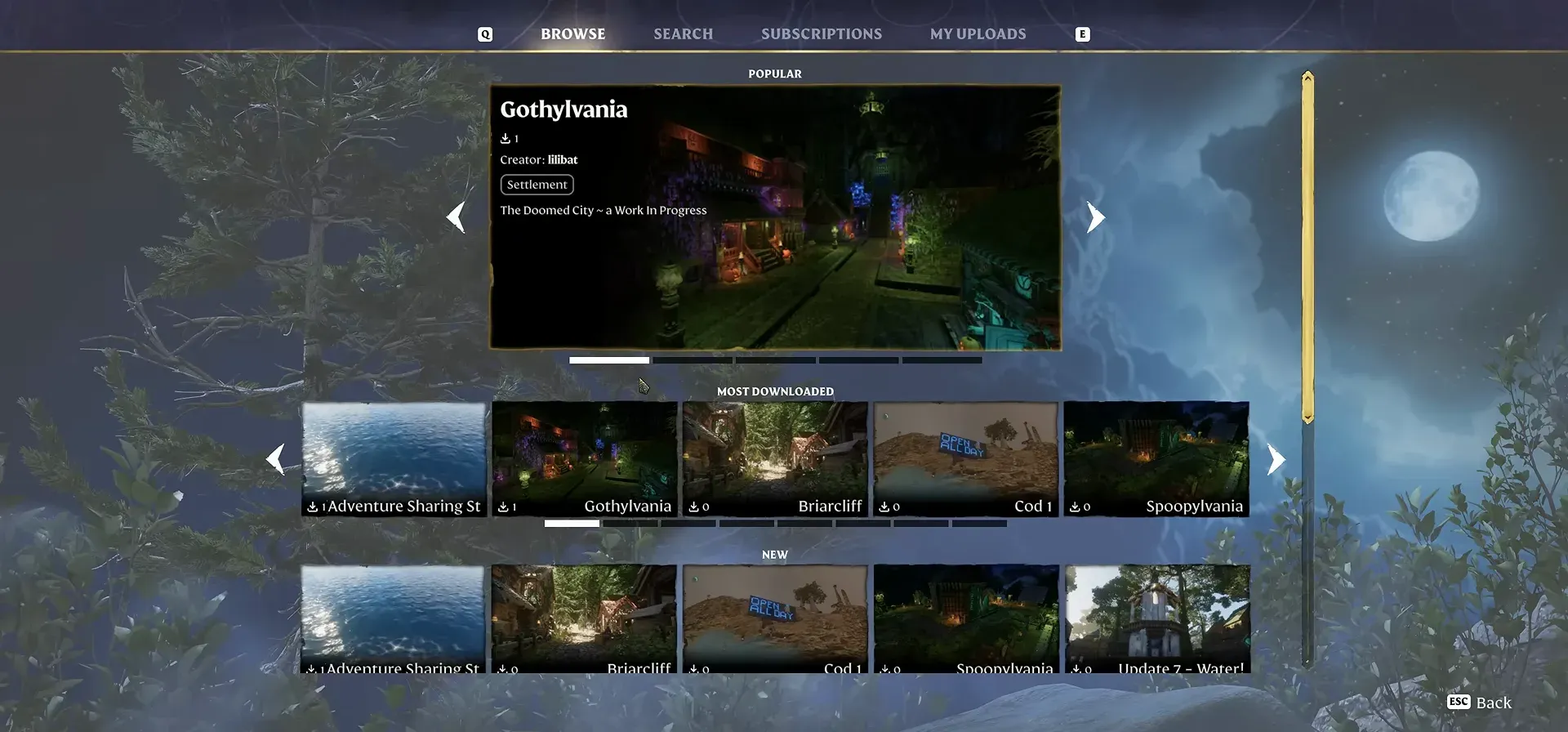
Qué hace Adventure Sharing
En su esencia, Adventure Sharing convierte tu guardado en contenido compartible:
- Sube tu mundo. Compartes el entorno que construiste construyendo, moldeando el terreno y colocando objetos, con un título, descripción, etiquetas y capturas de previsualización.
- Explora la comunidad. Busca mundos de otros jugadores por nombre, filtra por etiquetas y mira lo que la comunidad ha construido.
- Visita un mundo. Descarga y entra en el mundo de otro jugador para verlo en persona.
El objetivo de Keen es que puedas entrar a Enshrouded según tu ánimo y encontrar algo nuevo y emocionante sin depender de la historia principal para contenido fresco.
Qué llegó en la versión 1 (Update 8)
La versión 1 es la base - enfocada en subidas de bases y visitas de contemplación. Concretamente:
- Un menú nuevo. El menú principal fue rediseñado con un hub dedicado de Adventure Sharing para subir y explorar.
- Una cámara fabricable. Un nuevo objeto de cámara te permite tomar capturas de tu base in-game para usarlas como previsualización y mostrar por qué otros jugadores deberían visitarla.
- Interruptor de punto de spawn. Un interruptor en el Flame Altar te permite definir dónde spawnen los visitantes cuando entran en tu mundo - construye una entrada adecuada en lugar de una llegada dispersa.
- Contenido curado. Keen hizo que creadores comunitarios favoritos y ganadores de concursos subieran sus mundos antes del lanzamiento, para que la biblioteca esté poblada desde el día uno.
Las visitas son de solo lectura en la v1
Cuando visitas el mundo de otro jugador en la versión 1, estás en una visita de contemplación. No puedes recoger objetos, interactuar con enemigos ni ganar XP - al intentarlo aparece un mensaje de “Progression Disabled”. Es intencional: la v1 existe para recopilar feedback y establecer la base técnica, mientras que las funciones interactivas se construyen hacia 1.0.
Comprobación 1.0 (día de lanzamiento): las notas oficiales confirman que Sparkworks llegó con un editor de conexiones 2D, nuevas herramientas y props interactivos, además de mejoras de menú (votaciones reversibles, ver y votar durante la partida). Las etiquetas exactas de menú y el comportamiento de XP/loot del visitante quedan pendientes de verificación in-game.
Los términos, en corto
Adventure Sharing es una función gratuita in-game (sin compra más allá del propio juego). Desde los términos oficiales:
- El contenido de usuario es lo que subes: el mundo, su título, descripción, capturas y texto in-game propiedad del jugador.
- Tú conservas los derechos, pero otorgas una licencia para que la comunidad pueda acceder a tu mundo. No puedes vender, poner tras muro de pago ni asociar tu contenido con NFTs o blockchain.
- Acceder a un mundo significa entrar e interactuar con él, pero tus cambios no se guardan - el XP, los objetos y las conquistas que obtengas mientras visitas se quedan en tu propio perfil.
- Un ID de plataforma (por ejemplo tu ID de Steam) identifica al que sube.
Qué añadirá Adventure Sharing V2
La versión 1 es solo el principio. Keen ha confirmado que después de 1.0, Adventure Sharing V2 dará a los jugadores las herramientas para construir contenido interactivo para que otros exploren:
- Sistemas de lógica para elementos interactivos.
- La capa de conexión detrás de ellos es el sistema lógico Sparkworks, que llega con el 1.0 (not yet independently verified en el tiempo exacto de la v2).
- Puzzles y apariencia de enemigos.
- Trampas y otras mecánicas interactivas.
Llegó en 1.0: la lista de funciones de la V2 aterrizó como Sparkworks — conecta entradas (palancas, placas de presión) a salidas (puertas, trampas) para construir mazmorras de trampas, salas de puzzle, arenas y escape rooms.
En corto, V2 es el paso de “visitas de contemplación de bases” a “aventuras y minijuegos completos hechos por jugadores”.
Dónde ir a continuación
- Construye el mundo que quieres compartir. La galería de diseño de bases tiene layouts y consejos para los siete biomas.
- Entiende el ciclo de construcción. La guía para principiantes de Enshrouded cubre el Flame Altar y tu primera base.
- Mira qué más cambió Update 8. Las notas de parche de Update 8 (Forging the Path) cubren el árbol de habilidades y el rediseño de combate.
- Sigue la visión general. La hoja de ruta de Enshrouded rastrea 1.0 y los planes posteriores a 1.0.
Artículos relacionados
guides
Hotfix 1.0.1.1 de Enshrouded - Jefes Onslaught, cofres de artefactos y correccio
Hotfix 1.0.1.1 de Enshrouded (build 1285601): mecánicas de jefes Onslaught, más runas en cofres, acumulación de buffs y correcciones de cuelgues
guides
Enshrouded Parche 1.0.1.0 - Equilibrio de jefes y calidad de vida
Enshrouded Parche 1.0.1.0 (build 1283531): correcciones de jefes, reequilibrio, alternancia de esprint, silencio de chat, estabilidad.
guides
Cinder's Cradle en Enshrouded - Bioma de lava, islas flotantes y nivel 45-50
Cinder's Cradle es el bioma de lava de final de juego (niveles 45-50, Llama 9-11) de montañas e islas flotantes añadido en 1.0. Cómo llegar y sobrevivir.
¿Te resultó útil?
¡Gracias por tu opinión!